
Tables, kitchen and bills on one screen.
See every table, send the order to the kitchen the moment it is taken, and settle the bill the way your guests want to pay.
Free plan. No credit card needed. Live in 3 days.


Tables, KOT and the restaurant screens sit on the same system as your GST billing, stock and books.
1000+ businesses in 5+ countries sell with Ordrio.
The counter and the floor, on one system.
Bill and keep the books at the counter. Run the tables and the kitchen on the floor.
At the counter
Live- GST bills with barcode at the counter
- Stock, vendors and purchase orders
- Profit and loss, GST summary and daily reports
- Orders from your own website and app
On the floor
Live- Tables, floors and running orders
- KOT, kitchen screen and captain orders
- QR ordering, split bills, reservations
- Recipes that use up stock
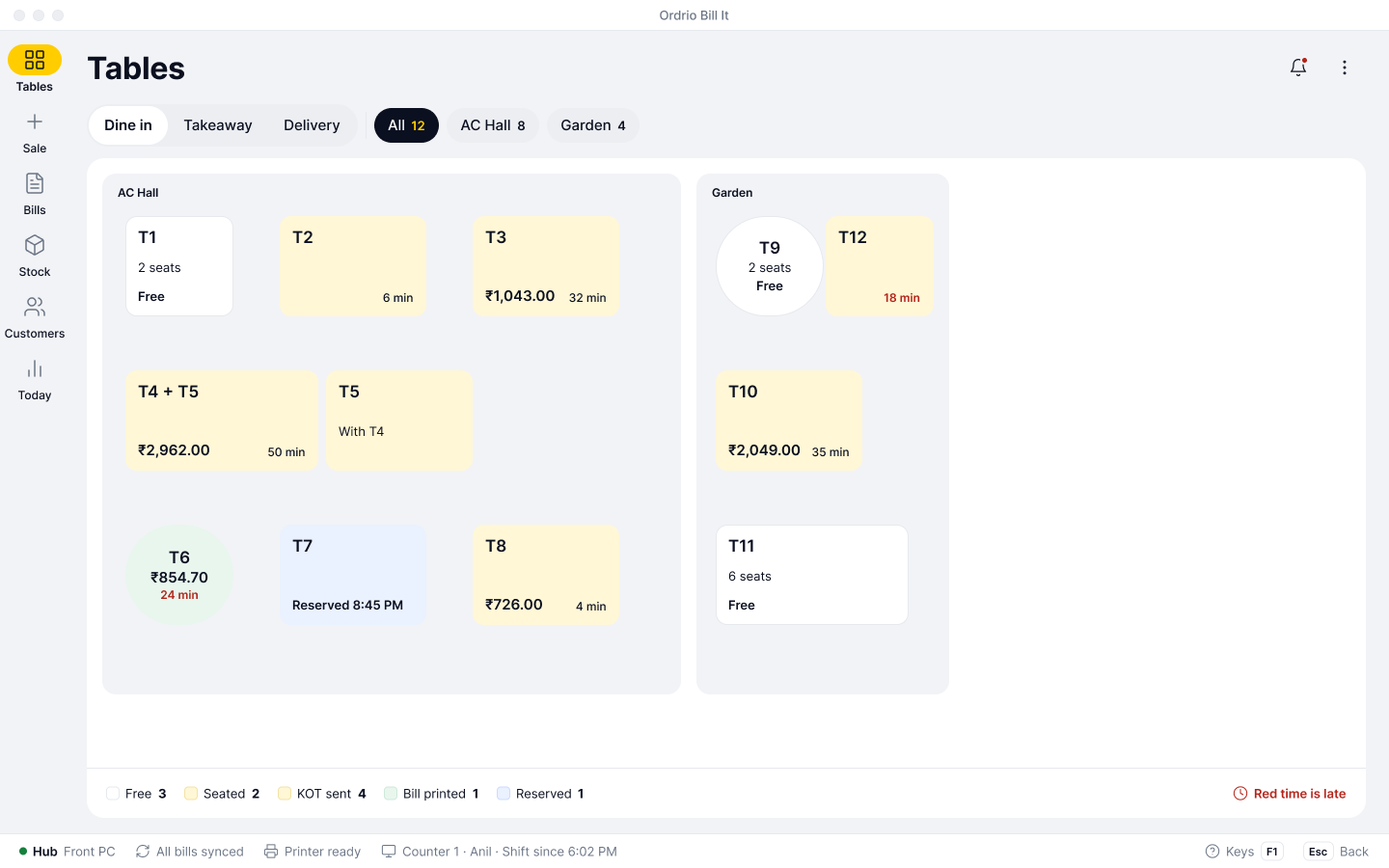
Every table, and how long it has waited.
The floor shows who is seated, which tables have their KOT in, which bill is printed and which table is booked for later.
Run the floor the way your service flows.
Areas, joined tables, timers and three order types, all on the same screen.
Floors and areas
AC hall, garden, rooftop. Each with its own tables and seats.
Join tables
Put T4 and T5 together for a big group, on one bill.
Running time
Each table shows minutes since it sat. Late ones turn red.
Running orders
Add rounds to an open table until the guests ask for the bill.
Dine in, takeaway, delivery
Three order types on the same screen.
Veg and non-veg marks
The green and red marks on every dish, on screen and on the KOT.
The kitchen gets the order before the waiter turns around.
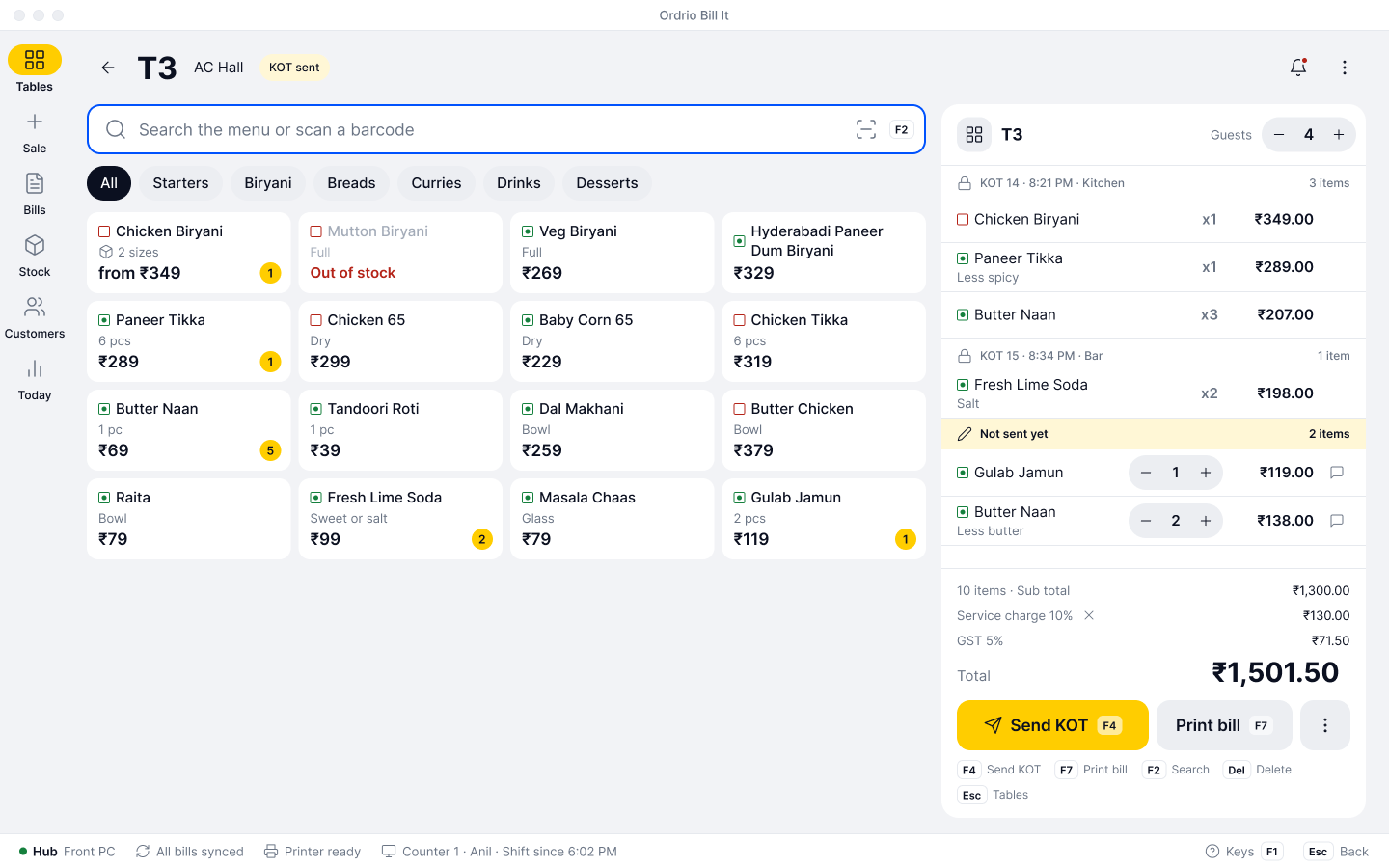
Tap Send KOT and the ticket prints at the right station, or shows on the kitchen screen, with the notes the guest asked for.
Chicken biryani, Paneer tikka (less spicy)New
Veg biryani × 2Cooking
Butter naan × 4Ready
Every station gets only its own tickets.
Printers, a kitchen screen and retries keep orders moving even on a busy night.
A printer per station
Kitchen, bar and dessert each get only their items.
Kitchen screen
A tablet on the wall shows new, cooking and ready tickets.
Failed KOT retry
If a printer is off, the KOT waits and prints when it is back.
Notes and toppings
Less spicy, no onion, extra cheese, printed on the ticket.
Reprint a KOT
Lost slip? Reprint it from the table in one tap.
Works on your shop network
Counter, kitchen and captain phones talk over your Wi-Fi.
Take the order at the table, on a phone.
Your captain opens the table in the Ordrio app, adds dishes and notes, and sends the KOT without walking to the counter.
- Same menu, prices and table status as the counter
- Notes like less spicy go straight to the ticket
- Runs on the Android phones your staff already have
No onion× 1
Let guests order from the table.
Each table gets its own QR. Your guests scan, order from your menu, and the order joins that table's running bill.
1. Guest scans
The QR on Table 7 opens your menu, already set to Table 7.
2. Guest orders
From your own menu, photos and prices, in their language.
3. Kitchen gets it
Your staff accepts it and the KOT goes out as usual.
Three friends, one table, no maths.
Split the bill equally in one tap, and settle each part with cash, card or UPI, or a mix of cash and UPI.
- Service charge and packaging as their own lines
- GST shown on every split
- Discounts above a limit need a manager PIN
Know who is coming tonight.
Take bookings for a time and a table, and keep a waitlist at the door when every table is full.
Sell a biryani. The rice and chicken go down on their own.
Give each dish a recipe once. Every bill takes the ingredients out of stock, so you know what to buy tomorrow.
Set the recipe
Chicken biryani uses rice, chicken and masala.
Sell the dish
40 biryanis go out tonight.
Stock goes down
Ingredients come off at every bill.
Buy in time
Low stock turns into a purchase order.
Set it up the way your team works.
One person doing it all, or a captain, a cashier and a kitchen. Tables, printers, KOT slips and charges live in one place.
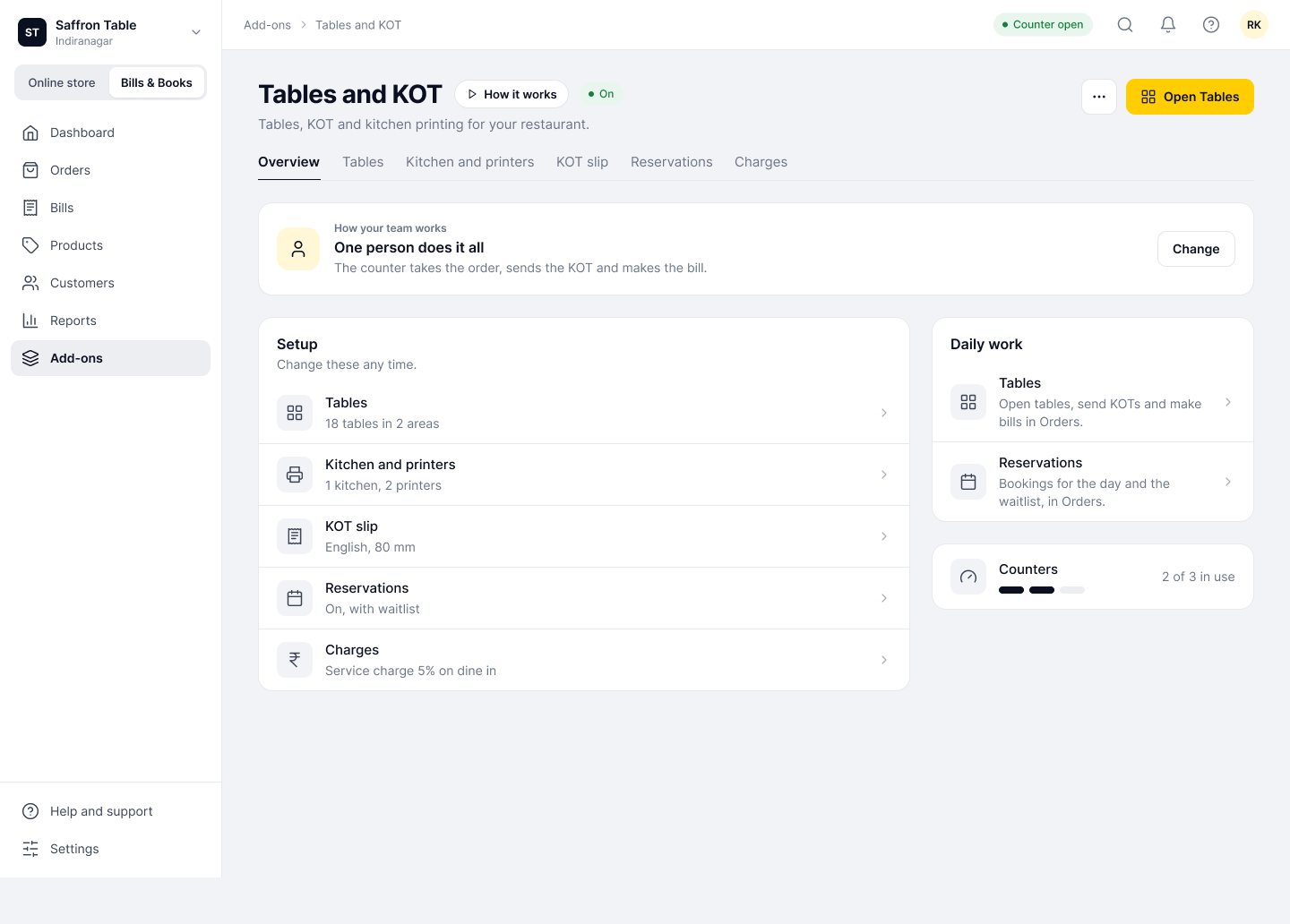
Nine settings, one screen.
Set them once on day one. Change any of them when your service changes.
- How your team works
- Tables in areas
- Kitchens and printers
- KOT slip language and size
- Reservations with waitlist
- Service charge on dine in
- Packaging charge
- Counters in use
- Print the day list
“The kitchen gets the ticket the moment the bill is made. No more shouting across the counter.”
Owner, restaurant, Mangaluru
Everything for your restaurant, in one list.
Grouped the way your service runs.
Floor 7
- Floors, areas and tables
- Join tables
- Running orders
- Running time per table
- Dine in, takeaway, delivery
- Reservations
- Waitlist
Kitchen 7
- KOT to printer
- A printer per station
- Kitchen screen on a tablet
- KOT reprint and retry
- Notes and toppings
- Veg and non-veg marks
- Print the day list
Ordering 4
- Captain orders on Android
- QR ordering at tables
- Orders from your own website and app
- Self-ordering kiosks
Billing 8
- GST bill with barcode
- Cash, card, UPI QR and split payment
- Discounts on a dish or the bill
- Returns and credit notes
- Split the bill equally
- Settle with cash and UPI together
- Service charge and packaging lines
- Manager PIN for discounts
Stock and purchases 6
- Stock and low stock list
- Vendors and purchase orders
- Purchase invoices and supplier payments
- Wastage
- Recipes that use up stock
- Batches and expiry
Books and reports 6
- GST summary by rate
- Profit and loss, balance sheet
- Sales by hour, top dishes
- Payments by method
- Zoho sync
- GSTR-1 export file
KOT pad, a restaurant POS, or Bills & Books.
| KOT pad and bill book | A restaurant POS on its own | Bills & Books | |
|---|---|---|---|
| Order reaches the kitchen | Waiter walks the slip | Printed KOT | Printed KOT or kitchen screen |
| GST bill | By hand | Yes | Yes |
| Your own online ordering website and app | No | Separate product | Same account, no commission per order |
| Ingredient stock from recipes | No | Often extra | Included |
| Profit and loss, balance sheet | At year end | Often separate software | Any day |
| Price to start | Pads and books | Yearly licence | Free plan |
A general picture, not a claim about any one product. See a named comparison
Start on the Free plan.
GST billing, stock and books are on the Free plan, with your online ordering store. KOT and QR ordering are add-ons.
- Bills & BooksFree plan
- Online ordering store and appFree plan
- KOT add-onPlans and price on the add-ons page
- QR ordering add-onPlans and price on the add-ons page
Read more
KOT
How tickets reach each station and the kitchen screen.
Read more →QR ordering
Let guests order from the table.
Read more →Split bills
Equal splits and mixed payments.
Read more →Reservations
Bookings and the waitlist.
Read more →Ordrio for restaurants
Your own ordering app and website, delivery and loyalty.
Read more →Bills & Books
Everything in billing, stock and books.
Read more →Questions restaurant owners ask
Yes. GST billing, stock, purchases, books and your online ordering store, plus tables, KOT, kitchen screen, captain orders, QR ordering, split bills, reservations and recipes.
When the order is sent, each station gets only its own items. Example: Table 3 orders a biryani and a lime soda, so the biryani prints in the kitchen and the soda prints at the bar. If a printer is off, the KOT waits and prints when it is back.
Thermal receipt printers of 58 mm or 80 mm, connected by USB or on your shop network. You can set one printer for bills and one per kitchen station.
Yes. Each table gets its own QR. The order joins that table's running bill and your staff sends the KOT. QR ordering is an add-on, with plans and price on the add-ons page.
Example: ₹1,300 of food, 5% service charge and 5% GST comes to ₹1,433.25. Split in 3, each guest pays ₹477.75, by cash, card, UPI or cash plus UPI.
Bill It, the desktop app, keeps billing and printing KOTs on your shop network, then syncs when the internet is back.
No. Orders on your own website and app carry no commission per order.
Yes. A cafe may need only counter billing and takeaway. A cloud kitchen may need only online orders and KOT. You turn on what you use.