
Your whole shop, in your pocket.
Orders, bills, stock, customers, offers, riders, reports and your team. The app you open before the shutter goes up and close after the last delivery.

Free plan. No credit card needed.
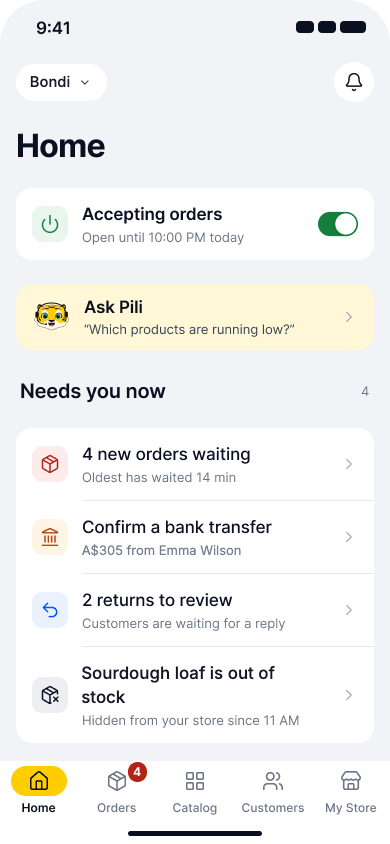
Know what needs you before the shutter goes up.
Home is built around one question: what should you do first today.
Accepting orders
One switch at the top. Turn it off and your store stays visible, but customers see Closed.
Needs you now
Orders waiting and how long the oldest has waited, orders stuck in one step, orders with no rider, bank transfers to confirm, returns to review.
Orders now
Running low
Home, further down
What runs out, and what to ask.
Home works out your stock and answers your questions with your own numbers.
Running low
Stock that runs out today, worked out from how fast it sells: "6 left, gone by tonight".
Ask Pili
Pili, your AI assistant, answers questions like "Which products are running low?" or "How were sales last week?" with your own numbers.
Every order, one next step at a time.
Orders from your website, your app and your counter land in one list. Each card shows the one thing to do next.
Fix, batch and settle orders in a tap.
The jobs that used to need a call or a computer.
When an order needs fixing
Change it without calling anyone.
- Edit items or quantity
- Partial delivery
- Reschedule delivery
- Cancel with a full or part refund
Many orders at once
Morning rush, handled in a few taps.
- Accept, pack or send out in bulk
- Pick the packer and the rider
- Find any order by number or name
- Filter by payment, delivery type, date
Money and returns
Nothing slips through.
- Confirm bank transfers
- Approve or reject refunds, retry failed ones
- Mark returned goods received
- Order log and notes on every order
Take the order on the phone in your hand.
Place orders for customers who call or walk in, and see your Bills & Books numbers wherever you are.
Items
How it reaches them
How they pay
Phone orders go into the same list.
Pick the items, the customer, the slot and how they pay. Send a payment link, or collect cash. A new address outside your delivery areas is flagged before you save.
- Coupons, extras and notes on the order
- Saved customers and addresses
- The order joins your Orders list like any other
Look up
Your counter's numbers, away from the counter.
Bills & Books is included from the free plan. The app shows what the counter sold today next to your online orders, with bills, stock, purchases and GST-ready reports.
- One total for online and in person
- Low stock from the same records
- See Bills & Books
Use a phone as a counter.
Bill at the counter from the app, even when the internet drops. Staff switch in with a PIN.
- Held bills, returns and day close
- Stock transfers between branches
- Batches and expiry
Fix your catalogue while the shop is quiet.
Add products, change prices and correct stock from the phone, without waiting to reach a computer.
Add a product, starting with what kind
The app asks what you sell first, then shows only the fields that kind needs. Photos come straight from your camera.
Scan a barcode
Point the camera at a pack to find it and change its stock or price.
Stock right, in every branch.
Turn products off, count by branch and update hundreds at once.
Show or hide in a tap
Sold out of mangoes? Turn the product off. Customers stop seeing it.
Stock by branch
Each branch keeps its own count. Change one without touching the others.
Bulk upload from a file
Add or update hundreds of products from one sheet. Skipped rows come back with the reason.
A catalogue customers can find their way in.
Categories, brands, names in their language, and a price list read from a photo.
Categories, brands and more languages
Sort products into categories and brands. With the multi-language add-on, write each product's name in Arabic from the same screen.
From a photo of a price list
Take a photo of a printed price list and the app reads the products for you to check.
Activity
See who your regulars are, and who went quiet.
Every customer, their orders, addresses and wallet, in the pocket you carry.
Approve sign-ups
For wholesale or members-only stores: new customers wait until you say yes.
Abandoned carts
See who left items in the cart and what they left.
Customer bands and lists
Group customers with the Customer Bands add-on, for prices and offers.
Run an offer and tell customers, from the app.
Create a coupon, send a message to your customers and see what each one brought in.
Coupons with dates and limits
Running, scheduled and ended, in three lists.
Messages to your customers
Write it, pick who gets it, preview it, send now or schedule. Push messages come with your own app.
Win back regulars from the same app.
See what your messages brought in and who to win back next.
- Points, referral and membership
- Automations like win back and birthday
- WhatsApp replies, in the app too
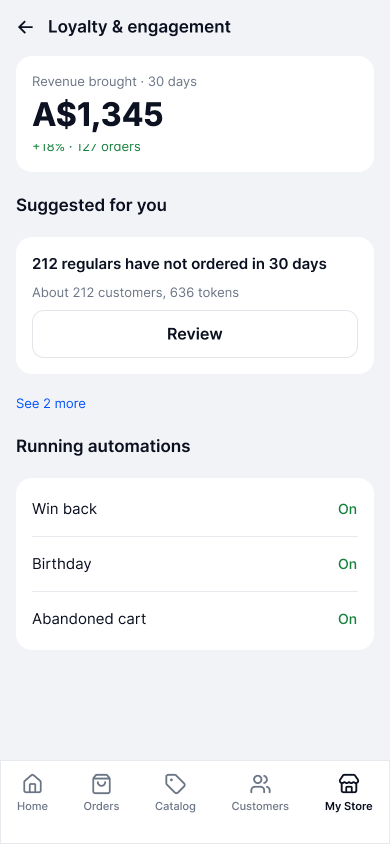
Loyalty and engagement
Send every order out, and know where it is.
Choose who delivers, give packing to a packer, and follow your riders. Swipe through on your phone.
Send out
Pick who takes the order.
Riders on a map
With the In-house delivery fleet add-on, Pro shows your riders live and assigns orders on its own.
Subscriptions today
What goes out on each route, which deliveries need a rider, who paused.
Slots, couriers and cash, all on the order.
Set where and when you deliver, book a courier for far orders and see the cash come back.
Areas, slots and charges
Delivery areas per branch, time slots, extra charges and store hours.
Send by courier
For orders that travel far, add the courier and its tracking link.
Proof and cash
Proof of delivery and the cash collected come back to the order.
Your riders get their own app.
They see pending orders, pick them up and mark them delivered. You see it all in the Ordrio app.
Rider app
See how the day went, before you sleep.
Sales, where orders came from, what sold and what people searched for. Today, yesterday, 7 days or 30 days.
The 7 days before in grey.
of customers order again. Average order, new and returning, side by side.
What sold, and what they could not find.
Top sellers, empty searches and every other report, or just ask.
Stock it, or send that word to a page.
Top categories, sales by delivery type, customers over time, top searches, message results. Export orders to a sheet.
Ask Pili and get the answer as a chart with the reason: "Weekend orders drove most of it. Bread and eggs sold the most."
See PiliGive each person only what they need.
Invite your staff to the app. Each role opens only the parts you tick.
- Invite by phone or email, see who has joined
- Choose which branches each person works in
- Staff activity: who changed what, and when
- Each person picks their own language: English or Arabic
Change your store without opening a laptop.
Most of what you set on the dashboard, you can set in My Store.
Hours and pauses
Opening hours per branch, holidays, and Pause orders when you are full.
Store design
Banners, the announcement bar, menus, pages and blog posts, with a preview.
Payments and checkout
Connect your payment gateway, cash on delivery, checkout options and refund settings.
Tax, bills and policies
Tax rates, invoice numbering, store policies and order reasons.
Your domain, messages, app and plan.
The rest of My Store, on the same screen.
Website and login
Connect your own domain, and choose how customers sign in.
Messages you send
Email and SMS senders, and which updates customers get.
Your own app
Send your branded customer app to Google Play and the App Store.
Plan and help
Change your plan in the app, how-to videos, support tickets and what is new.
One app for every kind of shop.
Restaurants, caterers and loyalty programmes run in the same app.
Restaurants
Tables, KOT to the kitchen, a captain screen, QR orders, reservations and the waitlist.
Catering
Event enquiries, quotes, the production sheet and packing labels.
Loyalty and engagement
Points, referral, membership, campaigns and automations.
iPhone
Open the dashboard in your browser, with the same login as the app.
"I see sales, stock and what to reorder on my phone before I open the shop."
Everything in the Ordrio app.
Grouped the way the app is.
Home Tab 1
- Accepting orders switch
- Needs you now
- Revenue, orders, average order, new customers
- Sales by hour or by day
- Orders now by stage
- Running low and top sellers
- Where orders come from
- Guided first steps with videos
- Ask Pili
Orders Tab 2
- One list for website, app and counter
- New order sound and alerts
- Accept, pack, send out, in bulk
- Decline or cancel with a reason
- Edit, partial delivery, reschedule
- Refunds, full or part
- Returns queue and goods received
- Bank transfers to confirm
- Order log, notes, export
- New order for a customer, payment link
Catalog Tab 3
- Add by kind: unit, weight, Flexi Box, service, digital
- Variants, photos from the camera
- Barcode scan
- Show or hide a product
- Stock by branch
- Bulk upload and update from a file
- Categories and brands
- Product names in Arabic
- From a photo of a price list
- Price lists
Customers Tab 4
- Every customer and their orders
- Addresses, wallet, wishlist
- Activity and abandoned carts
- Approve sign-ups
- Customer bands (add-on)
- Add a customer yourself
Offers and messages
- Coupons: running, scheduled, ended
- Usage report per coupon
- Messages to customers, now or scheduled
- Cart reminders
- Push messages with your own app
- Loyalty, referral, membership
- Campaigns and automations
- WhatsApp replies
Delivery and subscriptions
- Own staff or a delivery partner
- Assign packer and rider
- Live fleet map (fleet add-on, Pro)
- Delivery areas, slots, extra charges
- Courier tracking links
- Proof of delivery, cash to collect
- Subscriptions: subscribers, routes, needs a rider
- Pause, resume or cancel a subscription
Billing
- Bills & Books: today's bills, stock, purchases
- GST-ready reports
- Online and in-person totals together
- Phone as a counter
- Held bills, returns, day close
- Stock transfers, batches, expiry
Reports
- Today, yesterday, 7 or 30 days, or pick dates
- Top products and categories
- Sales by delivery type
- Customers over time, repeat rate
- Top searches, searches with no results
- Message results
Team
- Invite staff, seats per plan
- Roles you design, area by area
- Branches per person
- Staff activity
- Switch store or branch
- English or Arabic per person
My Store and settings
- Store hours, holidays, pause orders
- Store design: banners, menus, pages, blog
- Payments, checkout, refunds
- Tax and invoice numbers
- Policies and order reasons
- Domain and customer login
- Email and SMS senders
- Add-ons on and off
- Your own customer app on the stores
Help and account
- Help centre with videos
- Support tickets and report a problem
- What is new
- Plan, invoices and credit notes
- Profile, password, delete account
And more
- Restaurant tables and KOT
- Captain screen, QR orders
- Reservations and waitlist
- Catering enquiries and quotes
- Production sheet, labels
Questions owners ask
Not here? Talk to us.
Android phones, from Google Play, today. You can also do everything from the dashboard on any computer, with the same login.
No. The Ordrio app comes with every plan, including Free. Some parts, like the delivery fleet or Customer Bands, are add-ons you switch on.
Everyday work, yes: orders, stock, prices, customers, coupons, riders, store hours, design and staff. A few big-screen jobs, like designing an invoice layout, stay on the dashboard.
Yes. Turn on order alerts and pick the new order sound. Home also counts the orders waiting and shows how long the oldest has waited, for example 4 orders, oldest 14 minutes.
Yes. Make a role, tick only what it can open, for example orders but not reports, and invite people into it. You can also limit each person to certain branches.
Yes. Each person picks English or Arabic for their own app. Arabic shows right to left. Your staff can choose a different language from you.
No. The Ordrio app is for you and your team. Your customers order on your own branded website and app. You can send that customer app to Google Play and the App Store from My Store.